Instantly Track Who Has Estimated in Asynchronous Planning Poker with Smart Guess
For teams using Asynchronous Planning Poker, it's now easy to see who has given an estimate before your refinement meeting and who has not.
This is part 2 of the EstimatedBy feature release — see part 1 here. In this update, the field now works across all project types and card decks: Company managed projects, Team managed projects, Fibonacci decks, and T-shirt estimate decks.
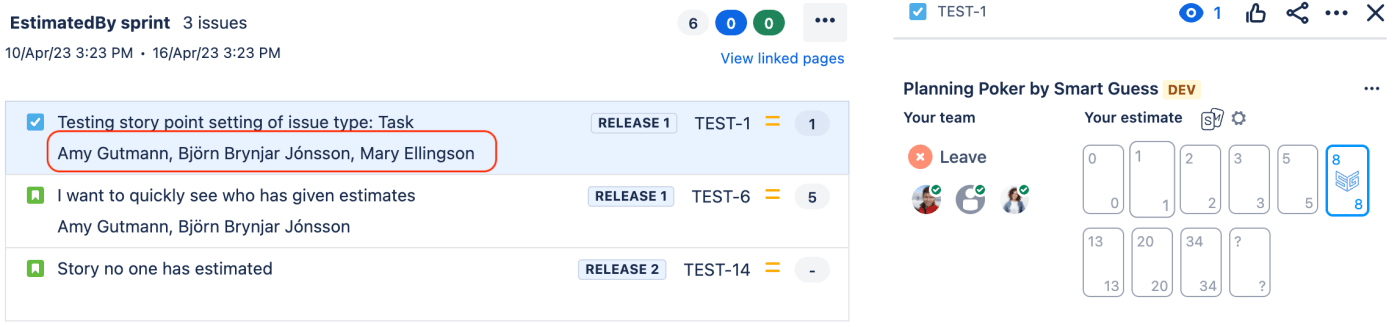
How the information is currently displayed will be improved by Atlassian. As the image shows, now full names are written out as a comma-separated list, which takes up a lot of space. Once Atlassian has improved on this, the field will be displayed like it is now being displayed within the Jira Issue view:
Most teams can't see what's holding them back.
Solution: Use Issue Search to access the status of estimates given quickly:
In the meantime, here is how you set up a JQL query to access this information efficiently.
- New issue field "Estimated by" automatically lists what users have provided an estimate in Smart Guess
- Create a simple issues search for your backlog using JQL
- "project = TEST order by rank"
- Replace the project key with your project
- Add the column "Estimated by" to screen
- Save your search for quick reference
Keeping this issue filter close by, with one click, you see the status of estimates given at a glance:
